.svg)

.svg)
%202.svg)
%201.svg)
Adopting AI Demand Forecasting: Start Small Before You Go Enterprise-Wide
More and more companies are taking a serious look at AI demand forecasting. Stockouts and excess inventory keep happening, and planners are spending more and more time manually overriding forecasts.
But once the evaluation gets underway, things get complicated. The quotes come back bigger than expected, and someone inevitably says you'll need to standardize your data first. The people who'd actually be using the system hear "another new platform" and start bracing for it. The conversation kicks off, and then the final decision slips to next quarter, then next year.
This article starts from that very dilemma. Instead of overhauling enterprise systems all at once, we look at how to apply AI demand forecasting to the one area where losses hurt the most. We'll walk through what you can expect from starting small and what's worth knowing before you begin.
Where Do AI Demand Forecasting Decisions Get Stuck?
Most teams agree that demand forecasting needs to improve. The real debate starts at the next step.
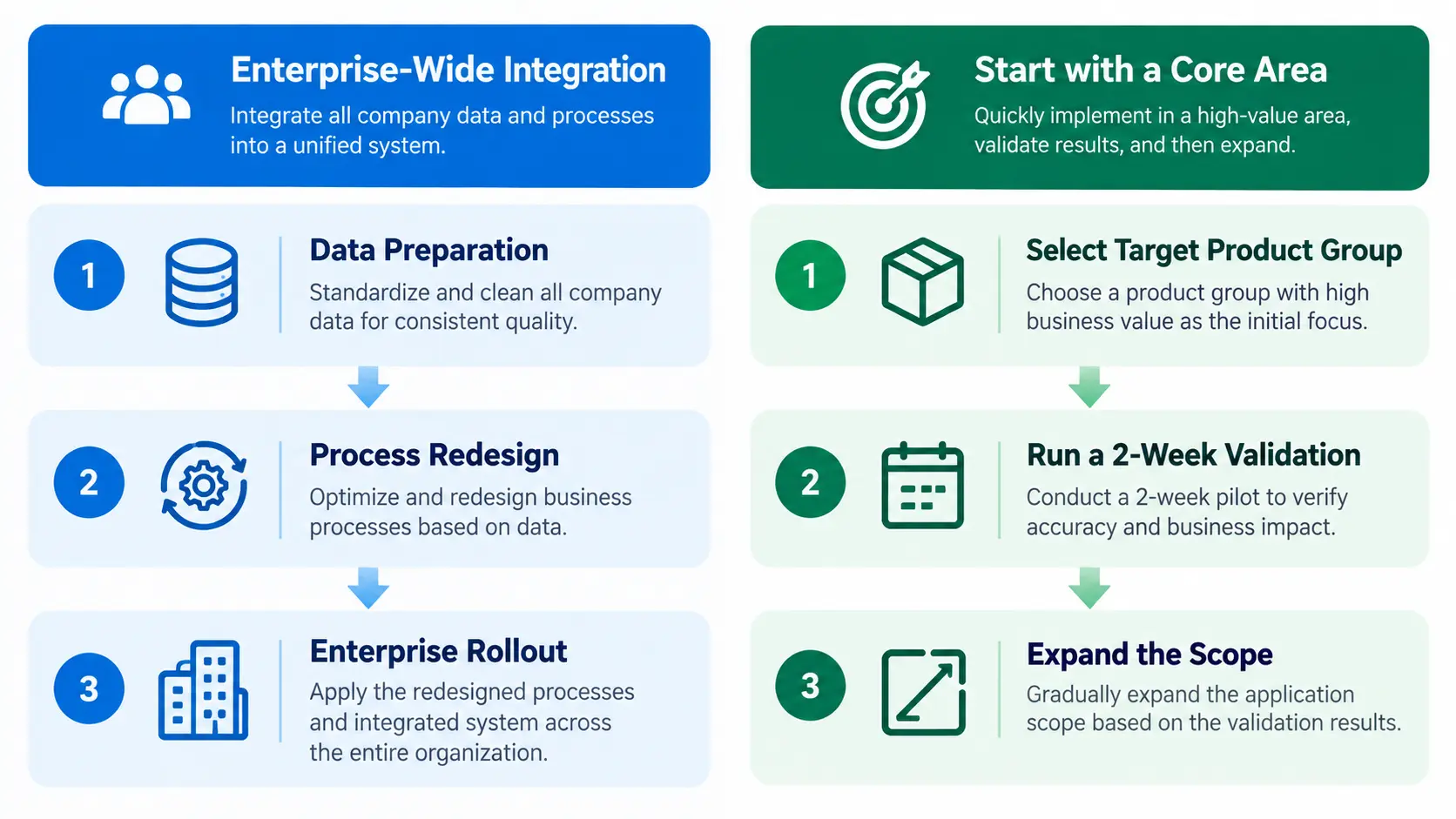
First, there's the question of scope. An enterprise-wide integrated planning platform ties demand, supply, production, and financial planning into a single system. The broader the scope, the more data cleanup and process redesign has to happen up front, and the longer and more expensive the rollout becomes.
Then there's the people side. For busy planners, a new solution means yet another unfamiliar screen to learn. And once you attach the words "AI transformation," the pressure rises right along with the expectations.
Finally, big decisions are hard to reverse. If a major commitment falls short of expectations, someone has to own that outcome. So it's not unusual for decision-makers to hold off on signing until they feel truly confident.
To be clear, some companies are best served by an enterprise-wide transformation. If you need to consolidate planning across multiple entities or plants, an integrated platform is the natural place to start. But if the problem is clearly defined, say, inventory that keeps piling up for certain SKUs or raw material costs climbing because of purchase timing, you can start by testing that one area first.
How Does AI Demand Forecasting Work?
Before starting small, it helps to get a feel for what AI demand forecasting actually does. The principle isn't so different from how an experienced planner works. Someone who's been in the role for years naturally remembers how much of a product moved around this time last year, or how much sales jumped ahead of the holidays. Drawing on that experience, they estimate how much volume they'll need next month.
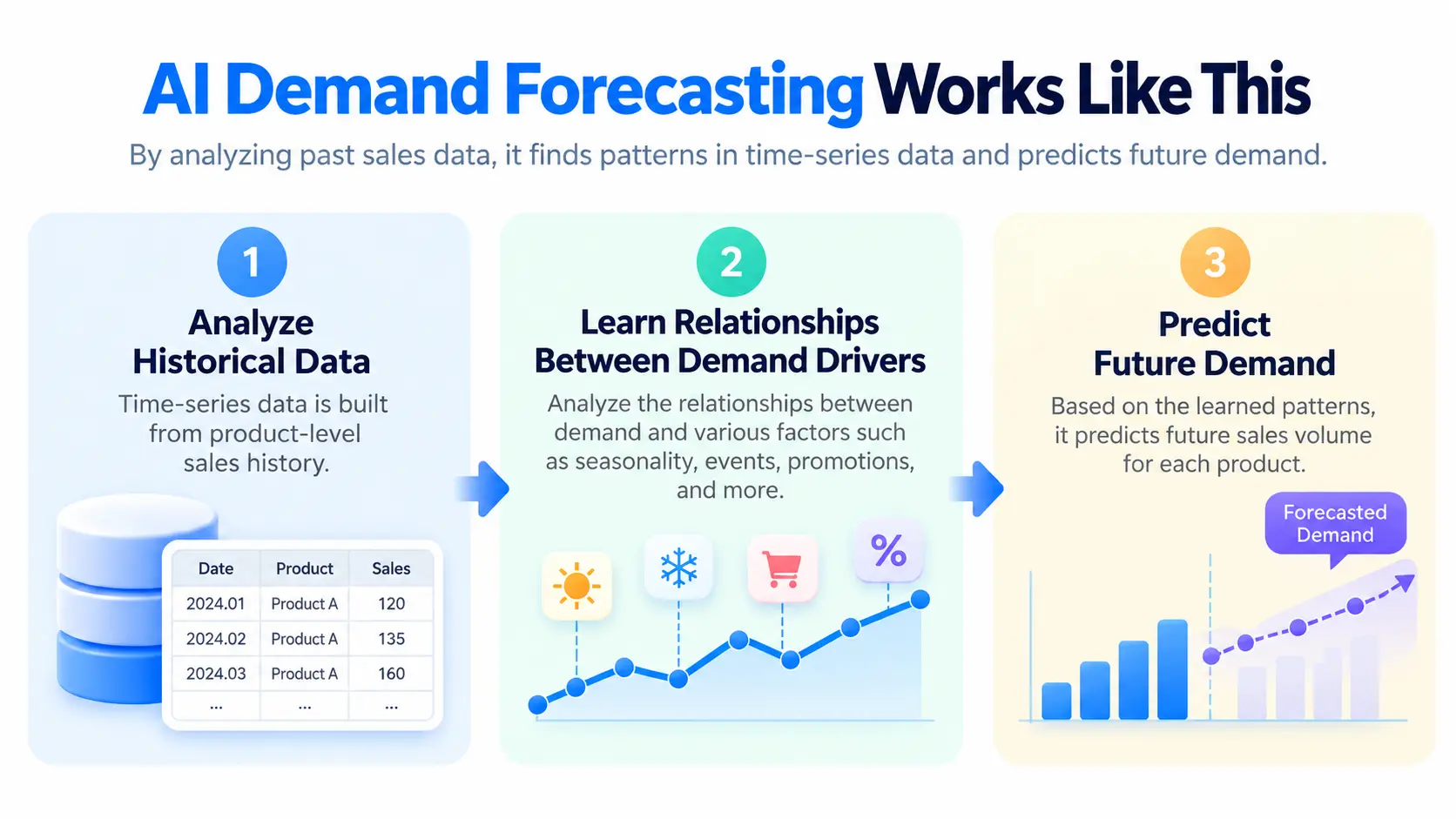
AI demand forecasting does something similar. The difference is that it relies on sales history data rather than memory or gut feel. It looks at how each SKU's sales have changed over time, whether there are patterns that repeat every season, and whether the overall trend is up or down, then uses all of that to forecast future demand.
This approach, analyzing data over time to make predictions, is called time-series forecasting. Think of it like flipping through your monthly household budget to estimate next month's spending.
There are clear differences from a human planner, too. No one person can realistically track the patterns of hundreds of SKUs one by one. AI, on the other hand, runs multiple forecasting models on each SKU, backtests them against historical data, and automatically picks the one with the lowest error. That means steady sellers and volatile items can each be forecast in the way that suits them best.
These days, it's not enough to just produce a number for the future. Explaining why the forecast came out the way it did has become just as important. Planners need that rationale to trust the AI's numbers and to defend them confidently in reports and meetings.
Where a Small Start Works Best: Use Cases and Industries
Starting small doesn't automatically work for everyone. The best places to begin are the ones where a narrow scope still produces clear, visible results.
In industries with short shelf lives like food and beverage, leftover inventory quickly turns into write-offs or markdowns. Here, picking a single hero product with a solid sales history and applying demand forecasting to it lets you see changes in inventory levels and other results in a relatively short time.
In seasonal businesses like fashion and beauty, core lines that sell reliably year after year make a good starting point. New products, by contrast, are harder to forecast because they lack historical sales data.
In industries where raw materials make up a large share of costs, such as steel, construction, and manufacturing, purchase price is often a bigger concern than sales volume. In that case, it helps to start by forecasting price trends for the one or two key raw materials that drive your costs.
These starting points have one thing in common: the team on the ground already has a good idea of where the losses are coming from. Think back over the past year to the SKUs with frequent stockouts, the products with heavy write-offs or markdowns, and the raw materials you overpaid for because of bad timing. You'll quickly have a shortlist of where to start.
Starting Small: Benefits and Limitations
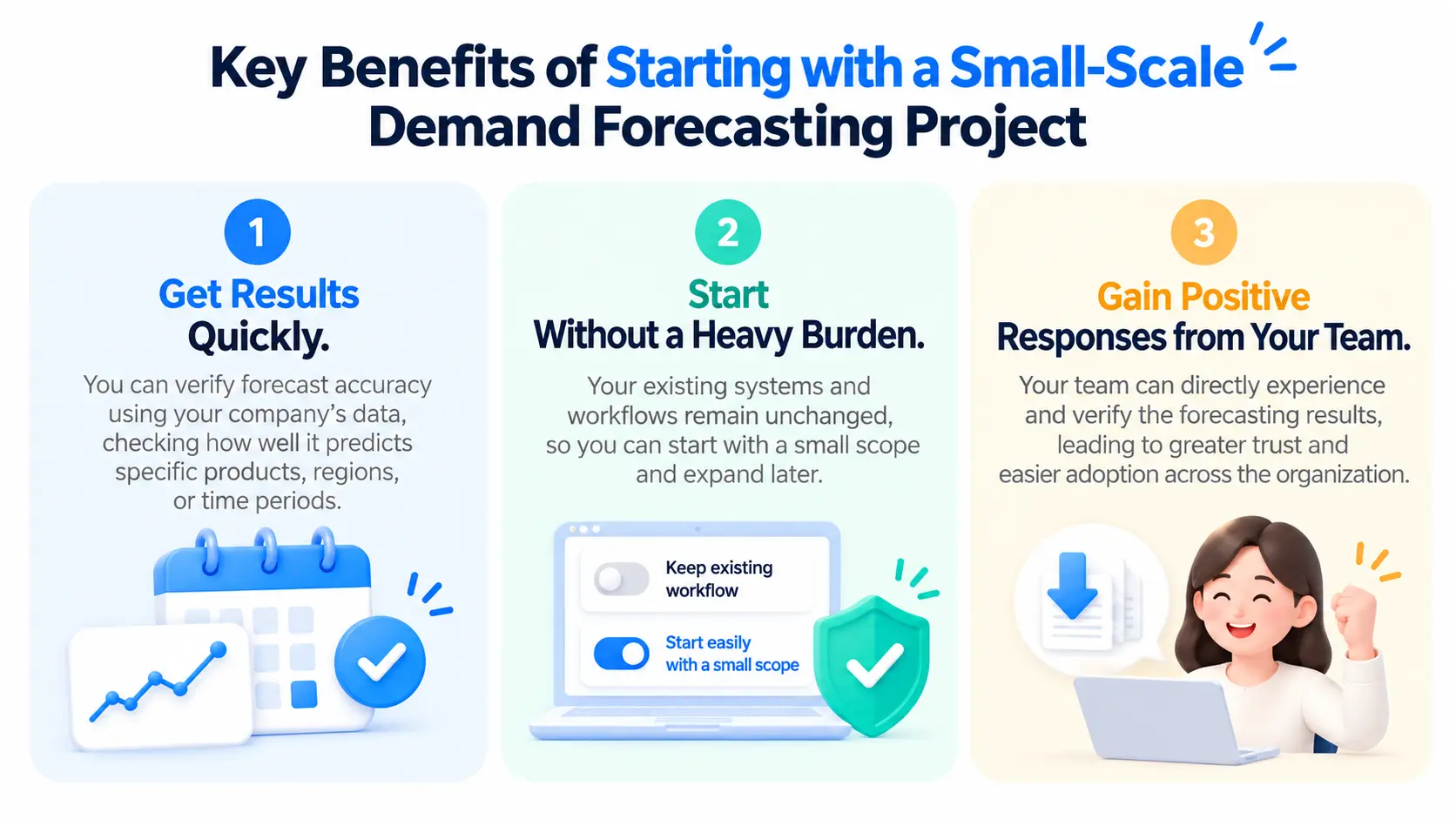
The biggest advantage of starting small is speed. Within days or weeks, you can find out whether forecasting actually works with your data and which SKUs are good candidates for it. With those results in hand, you can decide where to expand next based on evidence rather than instinct.
The risk is lower, too. Your existing systems and workflows stay in place and only a small part changes, so if the results fall short, you can always go back to the way things were. For decision-makers, being able to start small and evaluate thoroughly, rather than committing to a major investment, is a real plus.
Planners respond differently as well. When they see firsthand that the manual work eating up most of their time is shrinking, resistance to the new tool tends to fade on its own.
Of course, we often hear the question "If we start small, won't we just end up doing the work twice?" It's an understandable concern. But when you define scope and rework data and processes across the whole company at once, you're doing it without knowing which SKUs are actually suited to forecasting. If you test small first and expand from the areas where results are proven, you cut out a lot of wasted rework.
There are clear limitations, though. With a narrow scope, you won't immediately get the benefits of unified, company-wide planning. If you need to align production or supply plans across multiple plants and entities, a broader, integrated approach will eventually be necessary. And since the product group you pick first may not represent the business as a whole, it's wise to run another round of validation before extending the results to other areas.
Data and Costs to Check Before a Demand Forecasting PoC
A PoC, or proof of concept, is the stage where you test results on real data before full adoption. Most small-start demand forecasting initiatives begin here. And there's less to prepare than you might think.
Must-Have Data
Time-series forecasting needs just two things: item master data and sales history. For monthly forecasts, you'll need at least 24 months of sales history, and the longer the history, the better the model can pick up seasonal patterns.
Promotion data and external indicators help improve accuracy, but you don't need all of them from day one. Even if your company-wide master data cleanup isn't finished, you can start validating as long as you have sales history.
On the other hand, if you have no sales history or only a very short one, no solution will produce meaningful results. This is the one condition we recommend checking first.
Integration with Existing Systems
Existing systems like your ERP remain the system of record for execution and transactional data. AI demand forecasting takes that data and generates forecasts along with the reasoning behind them.
Many teams worry that their data will end up split across two places. During evaluation, it helps to check two things: whether you can extract the source data for forecasting from your existing systems, and whether there's a path to feed the results back into your workflow. Data structures and approval processes vary from company to company, so it's worth testing this once with real data.
Cost and Resourcing
Cost and complexity depend on scope. If you start with a single product group, both the volume of data to prepare and the people needed to review it shrink accordingly.
A first validation can be run with just one person to extract and hand off the data and one planner to review the results. Being able to test feasibility with your current team before setting up a dedicated project organization is another advantage of starting small.
Evaluation Criteria for User Adoption
This is also the stage to gauge whether the business will actually embrace the tool after rollout. When defining scope, one approach is to look first at where planners spend the most time today, rather than at which features you'll use.
Demand planners, for example, spend a lot of time digging into the drivers behind a forecast and rebuilding explanations for each department. For procurement teams, it's tracking raw material prices and pulling together reports. If you include "does this reduce that time?" in your evaluation criteria, you can get an early read on how the team will respond, separate from accuracy.
Starting Small with Deepflow
ImpactiveAI's Deepflow is an AI demand forecasting solution designed from the ground up for exactly this kind of adoption. Your current ERP and planning systems stay as they are, and Deepflow takes on only the work that calls for forecasting and judgment. Ordering and execution are still handled by your existing systems and team. Deepflow Forecast predicts SKU-level demand, and Deepflow Materials forecasts raw material price trends.
The newly revamped Deepflow Forecast goes a step beyond simply showing forecasts. It's focused on turning those results into real inventory and ordering decisions. Here are three features worth a closer look if you're starting on a small scale.
A Summary View That Flags At-Risk Items First
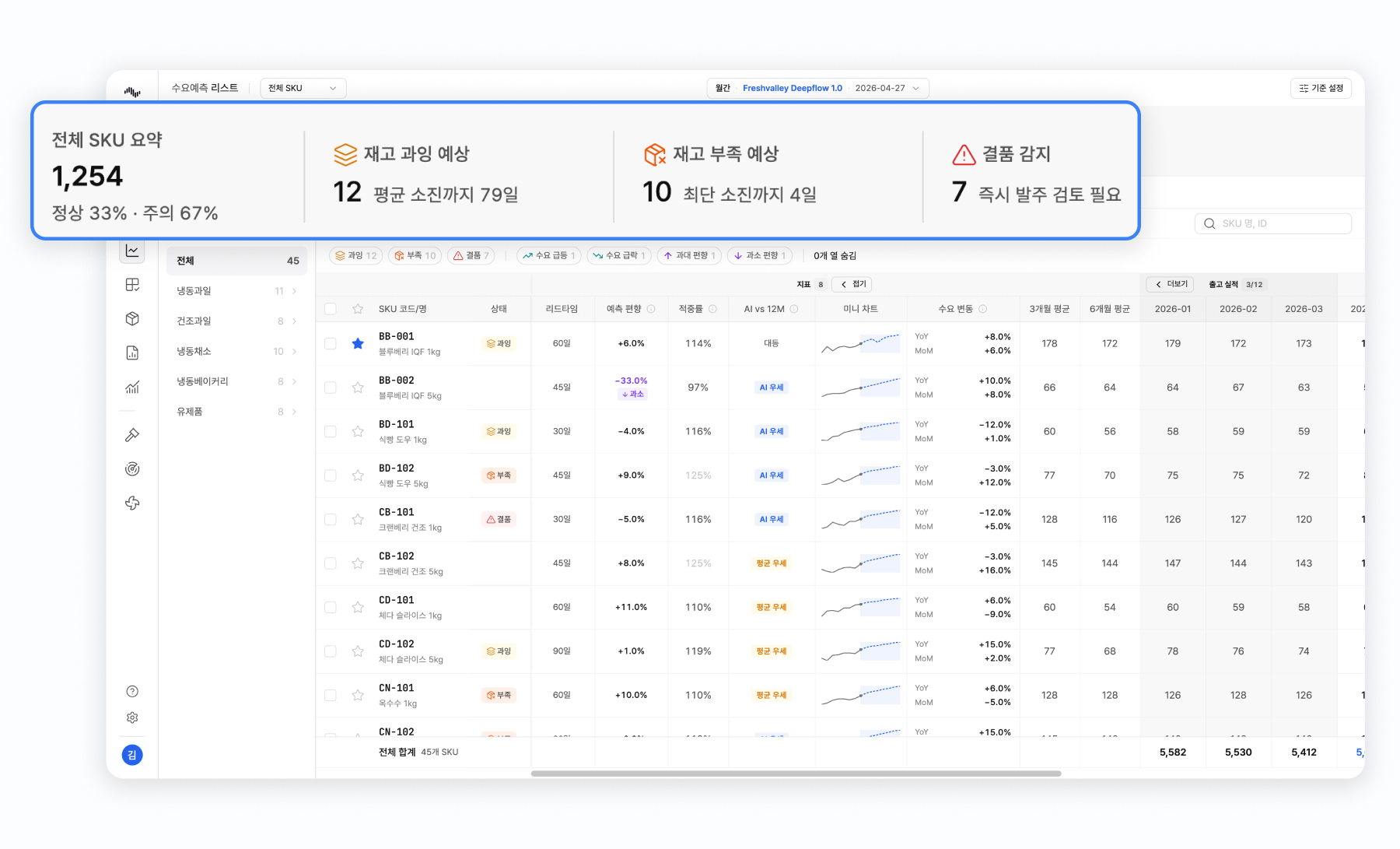
Once you're past a few hundred SKUs, there's no way to review every forecast chart one by one. Deepflow Forecast surfaces the items that need attention as soon as you log in. It classifies each item's inventory status as normal, short, overstocked, or out of stock, and automatically flags items with large demand swings compared to the previous month or the same period last year.
Inventory status also factors in each item's lead time. For an item that takes 30 days from order to sale, for example, you can check in advance whether current inventory will cover the next 30 days of expected demand. Just reviewing the flagged item groups gives you a quick sense of where to start.
Benchmarking Against Current Methods, Plus Response Scenarios
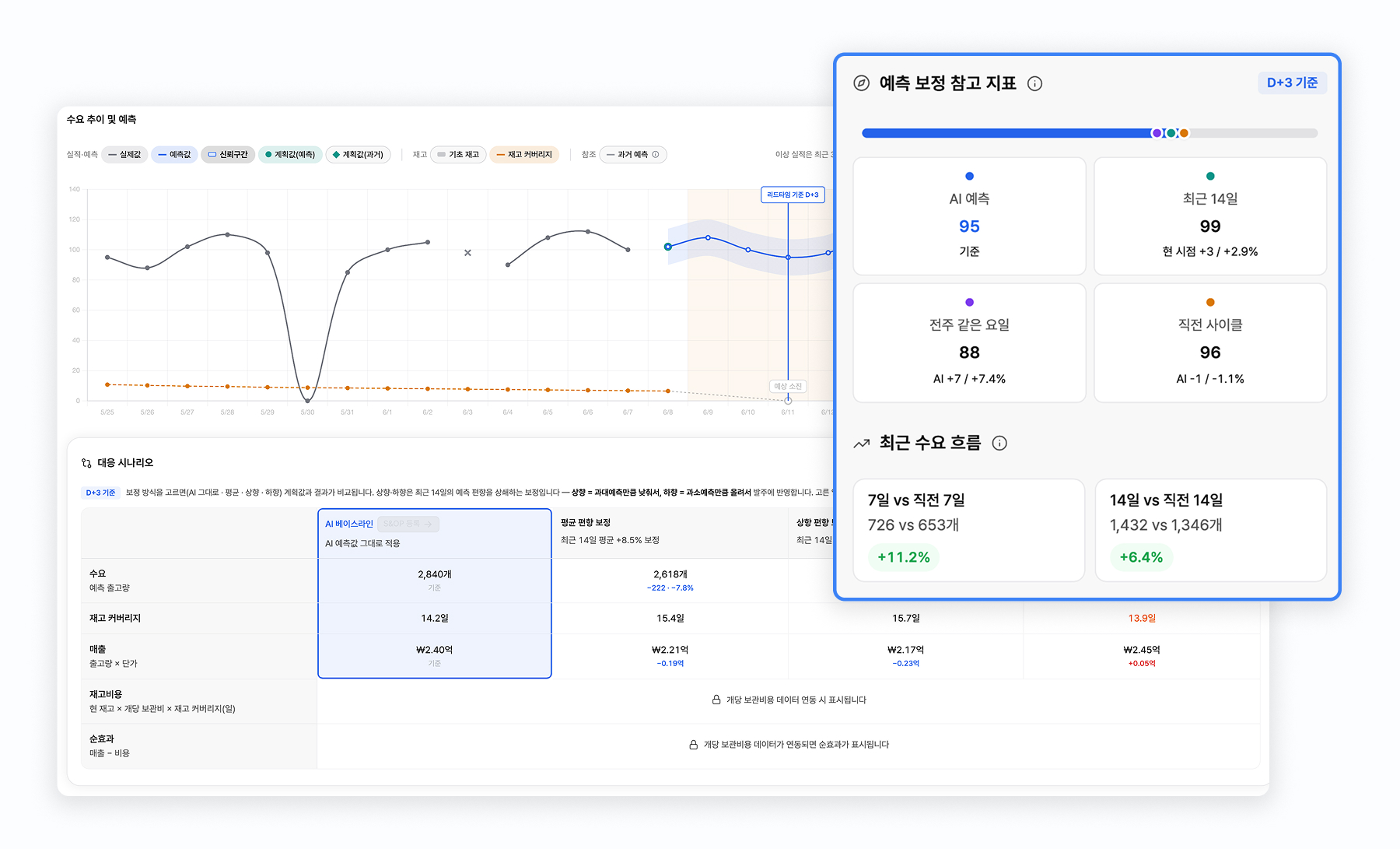
When starting small, the first thing planners and decision-makers want to know is "Will this beat what we're doing now?" Deepflow Forecast compares, item by item, the error of AI forecasts against the methods your team currently uses, such as 3-month or 6-month moving averages. It also shows past forecasts alongside actuals, so you can see whether certain items are consistently over- or under-forecast.
These comparisons give you the basis for deciding whether to expand. By separating the items where AI forecasts perform well from those where your current method holds up better, you can use data to decide where to roll out next.
You can also simulate different response scenarios based on your inventory policy. For example, you can compare what happens if you follow the AI's baseline forecast, lower quantities to reduce excess inventory, or raise them to prioritize avoiding stockouts, and use that to decide how to adjust orders and inventory. The final call always rests with the planner, but Deepflow provides the foundation to start from.
S&OP Built on AI Demand Forecasts
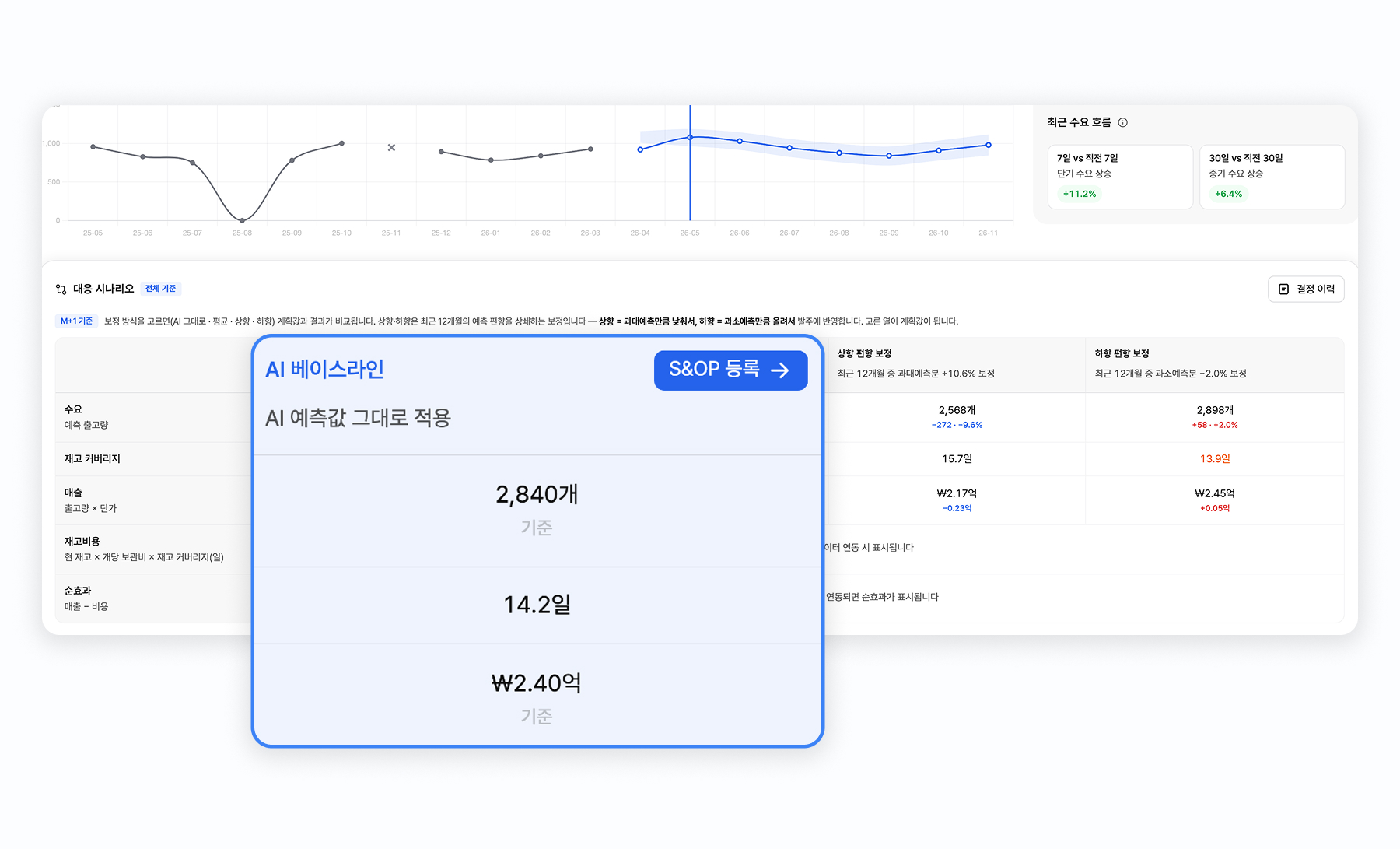
Once a small-scale forecasting effort is up and running, the next challenge is cross-functional alignment. Deepflow Forecast puts the sales team's plan side by side with the AI forecast and lets teams layer in field intel like promotion calendars, supporting the S&OP process of agreeing on a final demand plan. Say the AI forecasts 13,000 units, but sales believes 20,000 are needed to account for a home shopping campaign. Both numbers, the reasoning behind each, and why the team landed on the final figure can all be recorded directly in the system.
You can also log why actual sales deviated from the norm. Noting whether sales dropped because of a stockout or spiked because of a one-off promotion makes past results easier to interpret later, and over time those notes become training data for improving the forecasting models. As these records build up, planners can simply ask the AI assistant to pull up what they need. Decision rationale that used to be scattered across department spreadsheets and email threads ends up in one place.
Proven Technology and a Free PoC
Deepflow's forecasting technology has been refined over many years. It automatically selects the best-fit model for each SKU from a library of more than 224 forecasting models and is backed by over 80 patents. Companies such as Ildong Foodis have reduced inventory risk by more than 26% after adopting Deepflow.
For companies trying AI forecasting for the first time, we also offer a free PoC. There's no cost, and within two weeks of receiving your data, we deliver a report showing item-level forecasts, accuracy, and forecast trends at a glance. Because PoC results are intended for validation, they have limits when it comes to immediate operational use. But they're a strong basis for judging how well forecasting works on your data and which items to start with.
Choosing Your First Product Group for AI Demand Forecasting
When taking the first step, three questions can help. First, think about which product group has caused the biggest losses over the past year. Second, check whether that group has at least 24 months of monthly sales history. Finally, make sure there's someone ready to put the forecasts to work if the results look good. If a product group checks all three boxes, that's your starting point.
If you're overhauling your company's entire planning framework, an integrated platform may be the place to start. For that scenario, we've also put together four criteria for comparing AI demand forecasting solutions such as SAP IBP and Deepflow, which you may find useful.
Before making a big decision, a free PoC is a good way to see what results your own data produces.
.svg)


.svg)








%201.svg)
%202.svg)


.svg)